
Kotomil
Understand how you spend your time
3 Changes You'll Experience with Kotomil
was busy this week, but what did I actually do🤔...?
• 10 hours on documents
• 5 hours on travel
• 3 hours on housework
Seeing it in numbers eliminates vague anxiety.
Peace of mind from
"seeing" how you spend time
want to study, but I didn't have time again today😰...
Identify and cut wasted time.
Enjoy skill development and hobbies with the time you free up.
Time for
what you really want to do
'm trying hard, but I don't feel like I'm growing
"Study time increased by 5 hours compared to last month!" Confirming growth with data keeps you motivated.
Feel steady growth
through comparison
Key Features
Visualizing events entered in your calendar with data and graphs is Kotomil's greatest feature.
See what you spent time on
instantly
Did you work too much this week? Was study time enough?
Charts and data let you intuitively grasp imbalances in how you spend time.
The satisfaction of
filling your calendar with colors
Days when you did specific activities like "study" or "gym" are shown in color on your calendar.
Keyword trend analysis
Track increases and decreases in keywords you care about, like "reading" or "meetings," with graphs.
Notice waves in motivation and changes in how you spend time.
Use Cases for Various Purposes
💼 Work & Work-life
Employees
Record time spent on "meetings" or "travel" to review activities and create action plans.
Freelancers & Side jobs

Accurately track working hours for "Project A" or "Project B" to streamline client reporting and invoicing.
* Images are for illustration purposes.
🎓 Learning & Growth

Visualize time spent on "studying," "reading," or "certification prep" to monitor consistency and focus time.
See your effort objectively to maintain motivation.
- Register keywords by subject or theme to identify imbalances in your learning balance.
* Images are for illustration purposes.
🧘♀️ Health & Habit Improvement
Record activities like "exercise," "sleep," or "medical visits" with keywords to understand lifestyle and health habits.

Visualize consecutive days and time allocation to build habits without forcing yourself.
- Instantly see "days you missed" to find improvement hints.
* Images are for illustration purposes.
🎤 Hobbies & Lessons
Visualize hobby activities like "concerts," "hiking," "yoga," or "pottery" to feel how much you're keeping up with what you love.
Visualize hobby time that tends to get buried in daily busyness to regain a sense of fulfillment.
- Calendar views by keyword show this month's activities at a glance.

* Images are for illustration purposes.
👪 Family
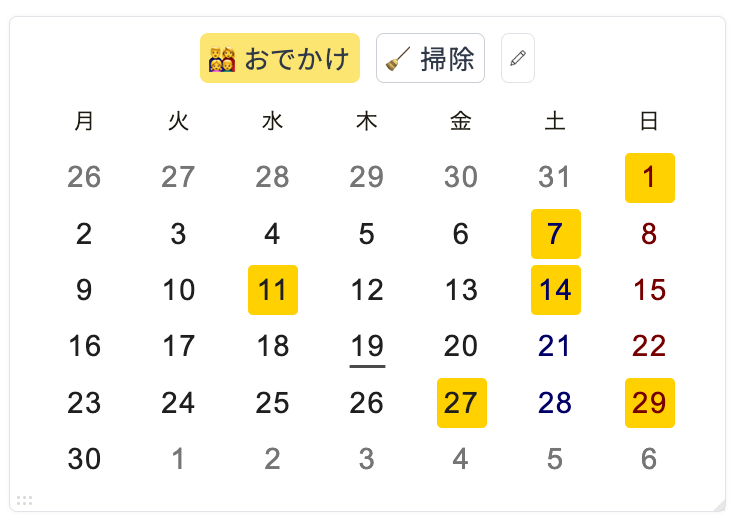
Record invisible daily activities like "childcare," "housework," or "daycare" to visualize the whole picture of your life.
Seeing time spent at home as well as at work in numbers helps you notice imbalances.
- Useful for sharing with partners about division of labor, childcare, and caregiving.
* Images are for illustration purposes.
Supported Calendars

Google Calendar

Outlook Calendar
* Just connect your usual calendar app to start analyzing immediately.
Frequently Asked Questions
If you have a Google/Microsoft account, you can start analyzing immediately.
* Only some advanced analysis features and keyword limit expansions are paid.
Connect Kotomil with these accounts to analyze your calendar events.
All-day events and tasks (ToDo) are excluded.
Only the "main calendar (default calendar)" is analyzed.
Shared calendars or other calendars you've added are not included.
See your results in 2 steps
Sign in with your calendar account
Check your results on the analysis page!
2 steps, 30 seconds,
Check your results immediately for free
Works with Google Calendar and Outlook